
Last updated on
Nov 9, 2026

CA Nations Direct Mortgage VA Child Care Statement 2013-2026 free printable template
pdfFiller is not affiliated with any government organization

Fill out
Complete the form online in a simple drag-and-drop editor.

eSign
Add your legally binding signature or send the form for signing.

Share
Share the form via a link, letting anyone fill it out from any device.

Export
Download, print, email, or move the form to your cloud storage.
Why pdfFiller is the best tool for your documents and forms


End-to-end document management
From editing and signing to collaboration and tracking, pdfFiller has everything you need to get your documents done quickly and efficiently.
Accessible from anywhere
pdfFiller is fully cloud-based. This means you can edit, sign, and share documents from anywhere using your computer, smartphone, or tablet.
Secure and compliant
pdfFiller lets you securely manage documents following global laws like ESIGN, CCPA, and GDPR. It's also HIPAA and SOC 2 compliant.
What is CA Nations Direct Mortgage VA Child Care Statement
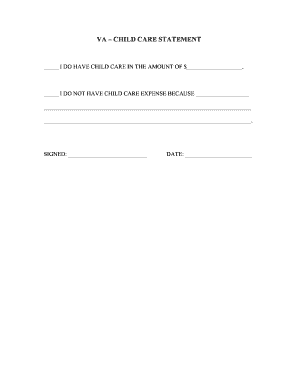
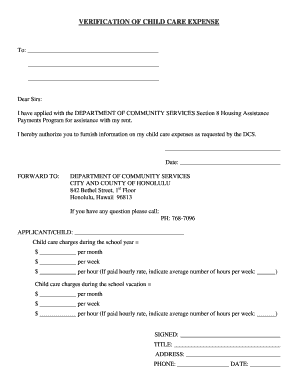
The VA Child Care Statement is a personal financial document used by borrowers to declare child care expenses for VA loan applications.
pdfFiller scores top ratings on review platforms




Much easier than printing out documents, signing and scanning.
it was easy to follow and the best feature is that it can automatically fill in previous information inputted.
Who needs CA Nations Direct Mortgage VA Child Care Statement?
Explore how professionals across industries use pdfFiller.

CA Nations Direct Mortgage VA Child Care Statement is needed by:
-
Veterans applying for VA loans
-
Borrowers needing financial assistance
-
Individuals with child care expenses
-
Financial advisors assisting clients with VA loans
-
Real estate agents supporting veterans
Comprehensive Guide to CA Nations Direct Mortgage VA Child Care Statement
What is the VA Child Care Statement?
The VA Child Care Statement is a critical document that helps individuals declare their child care expenses during the VA loan application process. It plays a significant role in assessing financial stability and eligibility for a VA loan. By completing this form, borrowers can provide necessary financial details relevant to their dependents, ensuring all child care costs are accurately represented within the application.
Purpose and Benefits of the VA Child Care Statement
This form assists in documenting child care expenses, which can significantly impact a borrower's financial assessment. By using the VA Child Care expenses form, applicants promote transparency in the VA loan borrowing process, which can enhance their chances of approval. Ultimately, it assures lenders that all financial considerations are understood, providing a clearer view of the applicant's financial landscape.
Key Features of the VA Child Care Statement
The VA Child Care Statement includes several essential features that streamline the reporting of child care expenses. Its structure comprises checkboxes for various child care scenarios and blank fields where borrowers can specify monthly expense amounts. Key features of the document ensure that all relevant information regarding dependents’ care is accurately captured in the VA dependent care form.
Who Needs the VA Child Care Statement?
The target audience for the VA Child Care Statement consists of borrowers applying for VA loans who have dependents. Those who meet specific eligibility criteria must complete this statement to ensure their child care expenses are duly recognized during the financial assessment process. This documentation is necessary to represent accurately any dependents' care that may affect the loan eligibility.
How to Fill Out the VA Child Care Statement Online (Step-by-Step)
-
Access the VA loan child care form online through pdfFiller.
-
Begin by entering your personal information in the required fields.
-
Indicate your monthly child care expenses using checkboxes and blank fields.
-
Provide any necessary explanations for the amounts stated.
-
Double-check all of your entries for accuracy.
-
Complete the form, then proceed to the signing section.
Common Errors and How to Avoid Them
Completing the VA Child Care Statement may involve common pitfalls. Frequent mistakes include inaccuracies in expense amounts and providing insufficient explanations for reported figures. To avoid these errors, carefully review the completed form and ensure all fields are filled out correctly before submission. Taking the time to double-check your work can prevent delays in the application process.
How to Sign and Submit the VA Child Care Statement
When it comes to signing the VA Child Care Statement, applicants have options for either a digital signature or a wet signature. Once signed, the next step is to submit the completed form through the designated channels, ensuring it reaches the appropriate office for processing. This streamlined method helps borrowers efficiently manage their submissions while adhering to necessary protocol.
What Happens After You Submit the VA Child Care Statement?
After submitting the VA Child Care Statement, borrowers can expect a series of steps in the application process. Tracking the status of the application is crucial, as it provides insights into the progress following submission. Outcome timelines may vary, but understanding what to anticipate helps borrowers stay informed and prepared for any next steps in the lending process.
Security and Compliance When Using the VA Child Care Statement
Data protection is vital when handling the VA Child Care Statement. Borrowers must be assured that their personal information remains secure throughout the completion and submission process. Utilizing platforms like pdfFiller, which adhere to robust security measures and privacy policies, can help safeguard sensitive information while ensuring compliance with legal data protection standards.
Experience Seamless Form Filling with pdfFiller
pdfFiller provides an intuitive platform for managing the VA Child Care Statement with ease and security. Users can benefit from the platform's user-friendly features, which simplify the form-filling experience, making it faster and more efficient. Emphasizing security and additional functionalities, pdfFiller ensures that borrowers can complete their forms with confidence.
How to fill out the CA Nations Direct Mortgage VA Child Care Statement
-
1.To access the VA Child Care Statement on pdfFiller, go to the pdfFiller website and use the search function to find the form by name.
-
2.Once you locate the form, click on it to open the document in the editing interface.
-
3.Before you begin filling out the form, gather relevant information such as any receipts or statements detailing your monthly child care expenses.
-
4.Start completing the fields; click on a checkbox to indicate whether you have child care expenses.
-
5.If you have expenses, enter the total amount in the designated blank field and provide any additional explanations if necessary.
-
6.After filling out all relevant sections, take a moment to review the information entered for any errors or omissions.
-
7.Once the form is complete and accurate, follow the prompts to save your work, download the form, or choose to submit it directly from pdfFiller.

Who needs to complete the VA Child Care Statement?
Borrowers applying for VA loans who have child care expenses must complete this form to accurately declare their financial situation.
What information do I need to fill out this form?
You'll need details about your monthly child care expenses, including any related documentation or receipts that support your claims.
How do I submit the VA Child Care Statement?
After completing the form on pdfFiller, you can submit it directly through the platform or download and mail it to the appropriate VA office, following their guidelines.
Are there any deadlines for submitting this form?
Submission deadlines can vary based on your loan application timeline; ensure you check with your VA loan representative for specific dates.
What are common mistakes when filling out this form?
Be sure to avoid omitting any necessary details, double-check the amounts stated, and ensure all sections are completed to prevent delays in your application.
How does processing work for submitted forms?
Once your VA Child Care Statement is submitted, it typically undergoes a review process, which can take several days, depending on the workload of the processing office.
Do I need to notarize the VA Child Care Statement?
No, the VA Child Care Statement does not require notarization, making it simpler to complete and submit as part of your loan application.
Related Forms





Related Catalogs
Get the latest insights from our blog


If you believe that this page should be taken down, please follow our DMCA take down process
here
.
This form may include fields for payment information. Data entered in these fields is not covered by PCI DSS compliance.